Installation and Quick Start
Download きせった (Kisetter) 3.5.0 from Booth, install it in your Unity project, and prepare your first fitting.
きせった (Kisetter) 3.5.0 documentationBefore You Begin#
きせった (Kisetter) is a Unity editor tool that adapts clothing made for one Humanoid avatar to another avatar's body shape. It automatically adjusts the clothing's bones, mesh, and weights, and also supports manual bone adjustments and saving the result as a BlendShape when needed.
Supported Environment#
| Environment | Unity version |
|---|---|
| VRChat | Unity 2022.3.22f1 |
| Warudo | Unity 2021.3.18f1 |
| General Unity projects | Unity 6000 |
- Supported OS: Windows and Linux
- Required external dependencies: None
- Avatar rig: Unity Humanoid
Installation#
- Download the files from the きせった (Kisetter) Booth page.
- Extract the archive and locate the included UnityPackage.
- Open the Unity project where you want to use the tool.
- Double-click the UnityPackage, or select Assets → Import Package → Custom Package from the Unity menu.
- Select every package item, then click Import.
- Confirm that the きせった (Kisetter) files were created at the following path.
Assets/@Eden_Tools/Eden_AutoMorpher
Start きせった (Kisetter)#
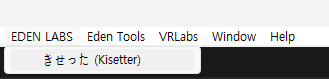
- From the Unity Editor menu bar, select EDEN LABS > きせった (Kisetter).
- きせった (Kisetter) opens in a separate editor window.
Updating to the Latest Version#
If an earlier version is already installed, import the new UnityPackage over the existing project without removing the old version first. Select every item in the Import window.
Choose Your First Task#
- To automatically fit an outfit to the target avatar, see the Automatic Outfit Fitting Guide.
- The bone adjustment feature from the former Manual Fitting Mode is available before the transformation when you select Enable Pre-adjustment.
- To add an avatar's BlendShapes to clothing, see BlendShape Generator.
If you encounter a problem, check Q&A and Troubleshooting or follow How to Contact Support.
Still need help? Ask in the Discord Help channel ↗