
BlendShape Controller
Review and adjust BlendShapes across multiple meshes in one place.
きせった (Kisetter) 3.5.0 documentation⚫ This tool lets you adjust the BlendShapes of all Meshes under an Object at once.
1. Assign Root Object#
- Assign the top-level parent object containing the meshes to be adjusted together with the BlendShape to the Target Root Object.
2. Refresh Mesh List#
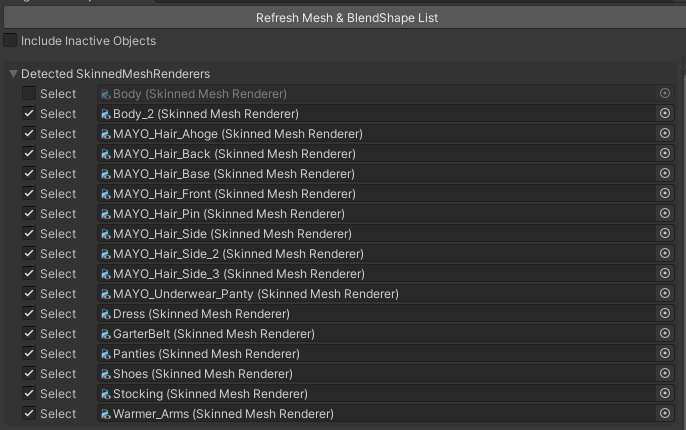
- Click the [Refresh Mesh & BlendShape List] button to update the mesh and blend shape lists.
- If [Include Inactive Object] is enabled, deactivated (Active OFF) meshes will also be included in the list.
- If you uncheck the Select box, the corresponding object will be excluded from BlendShape adjustments and list updates.
3. BlendShape Adjustment#
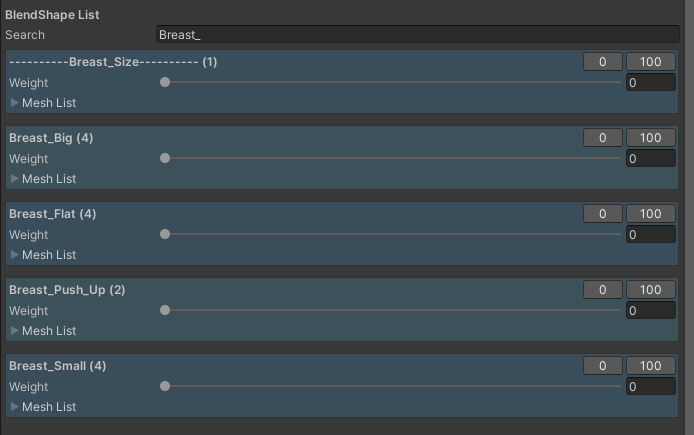
- **The BlendShape List displays all BlendShapes associated with the meshes.**1.
- Enter a BlendShape name in the Search field to filter and display only the desired BlendShape.
- The Mesh List at the bottom displays the list of meshes that have that BlendShape.
- You can adjust the BlendShape value by moving the Weight Slider or clicking the [0] [100] buttons.
Still need help? Ask in the Discord Help channel ↗